
Related Tools
Wheel of Names – Free Random Name Picker & Spinner
Wheel of Names is a free random name picker and wheel spinner for quick and fair selections. Add your names, click the spin button and let it choose a random name or winner. This tool is useful for classrooms, giveaways, teams, games, events and everyday decisions. You can use this online name wheel without downloading an app or creating an account.
What Is a Wheel of Names?
A Wheel of Names is an online random picker that selects one name or option from a list. Add your entries, spin the wheel and get a random result. This name picker wheel helps you make a fair selection without choosing manually.
How to Use the Random Name Picker
Customize the wheel before each spin to match your needs. Follow the steps below to set up your wheel and manage your results.
Step 01: Set up Your Wheel
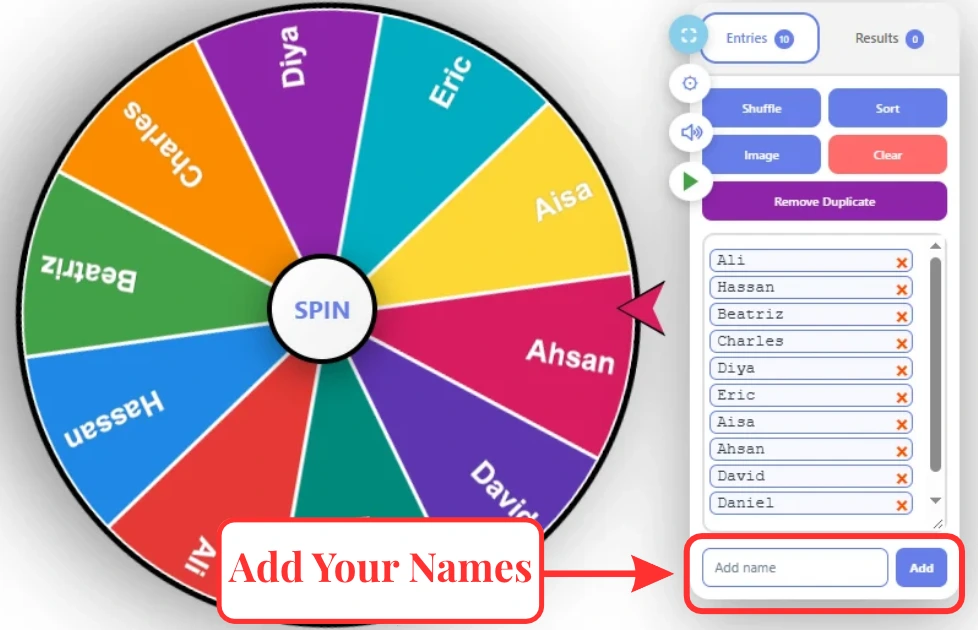
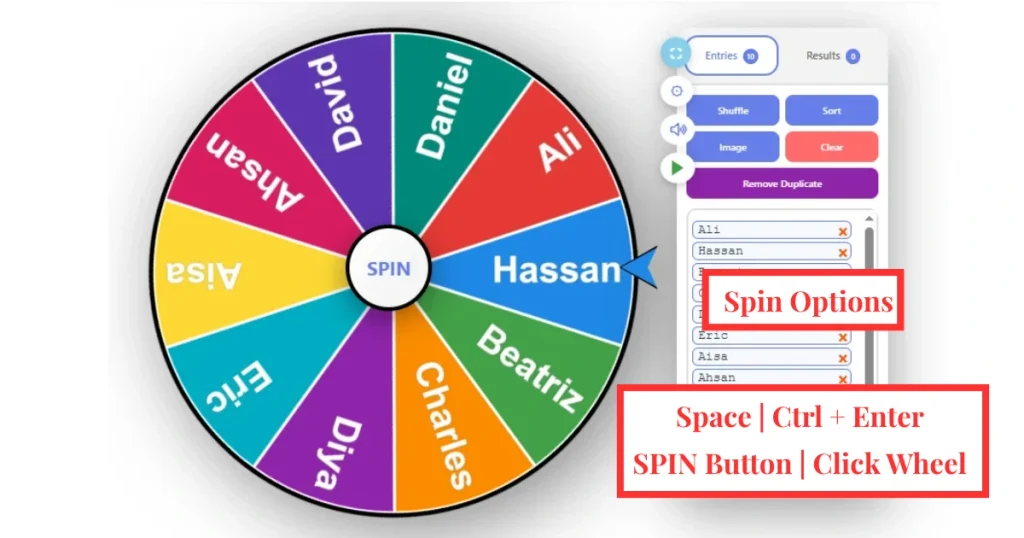
Before you spin, enter each name or item on a new line in the entry box. For example, you can add Ali, Hassan and Diya.
Once your list is ready, you can organize the entries or customize the wheel before spinning.
Organize Your List
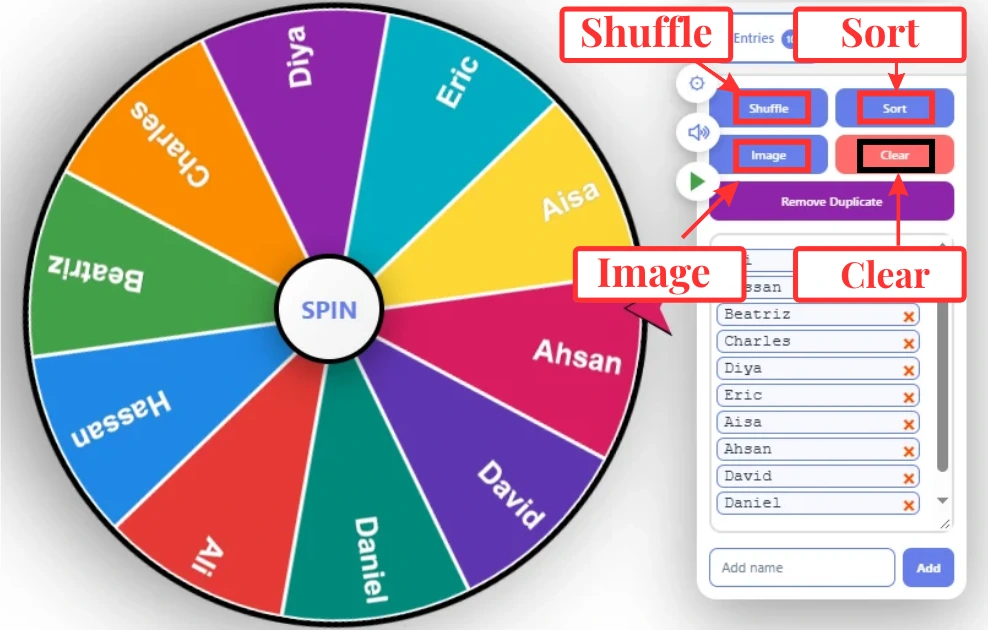
Use the quick-action buttons above the entry box to manage your names and other entries.
Shuffle – Randomizes the order of your entries.
Sort – Arranges the entries alphabetically.
Image – Adds an image to an entry.
Clear – Removes all entries from the list.
These controls make it easier to prepare your Wheel of Name before each spin.
Remove Duplicate Names
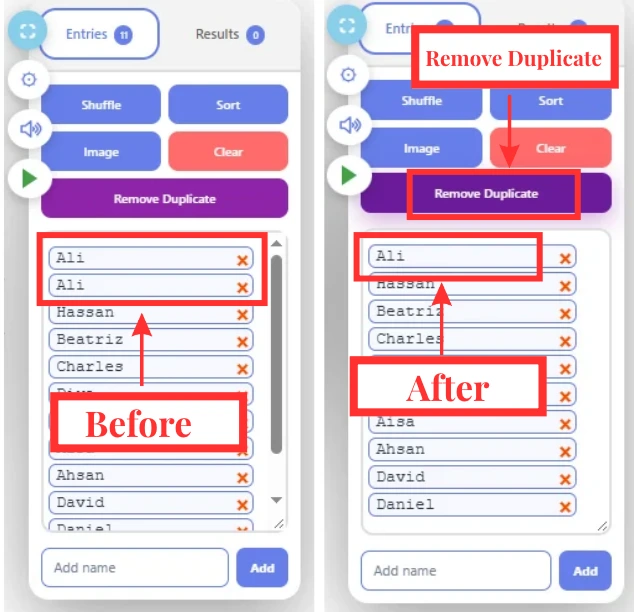
The Remove Duplicate button quickly finds and removes repeated names from your list. It keeps only one copy of each entry, helping you prepare a clean wheel of random names before spinning.
Turn Sound On or Off
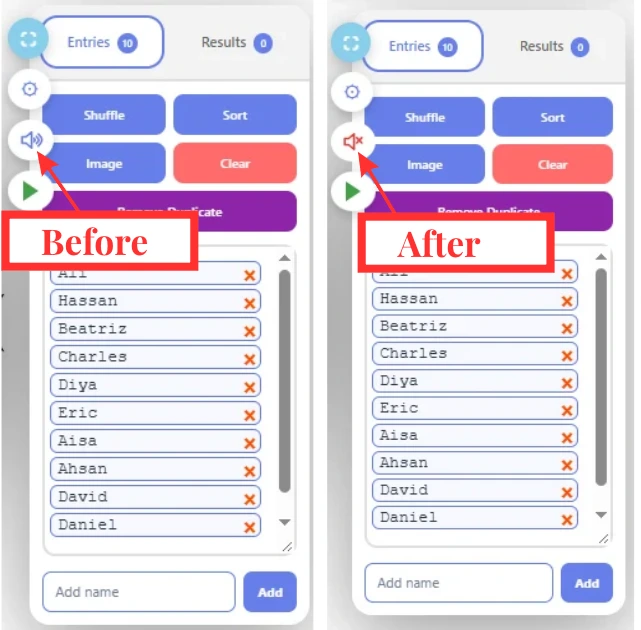
Click the speaker icon on the toolbar to turn the wheel sound on or off. Keep the sound on for a more engaging spinning experience or turn it off when you want to use the spinner in a quiet environment.
Use Fullscreen Mode
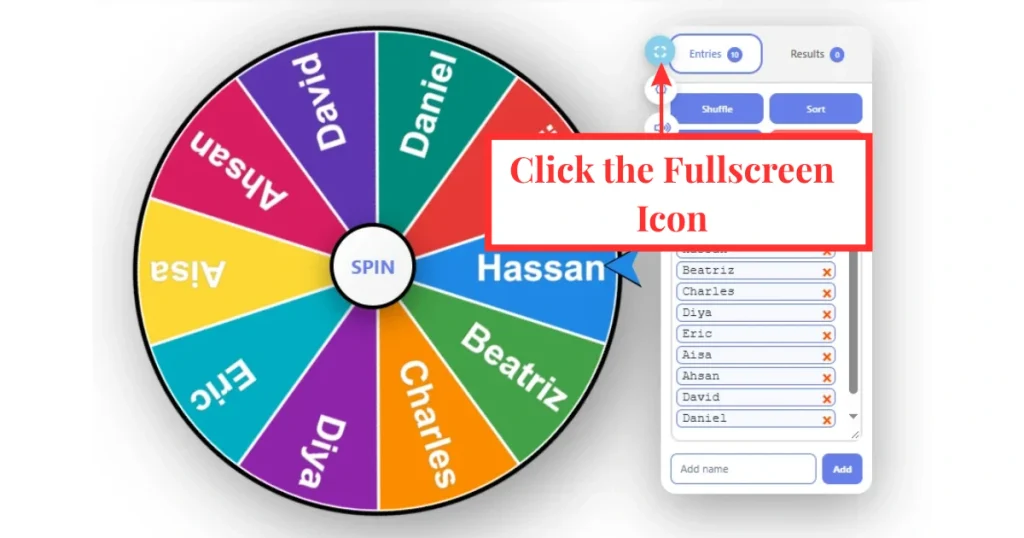
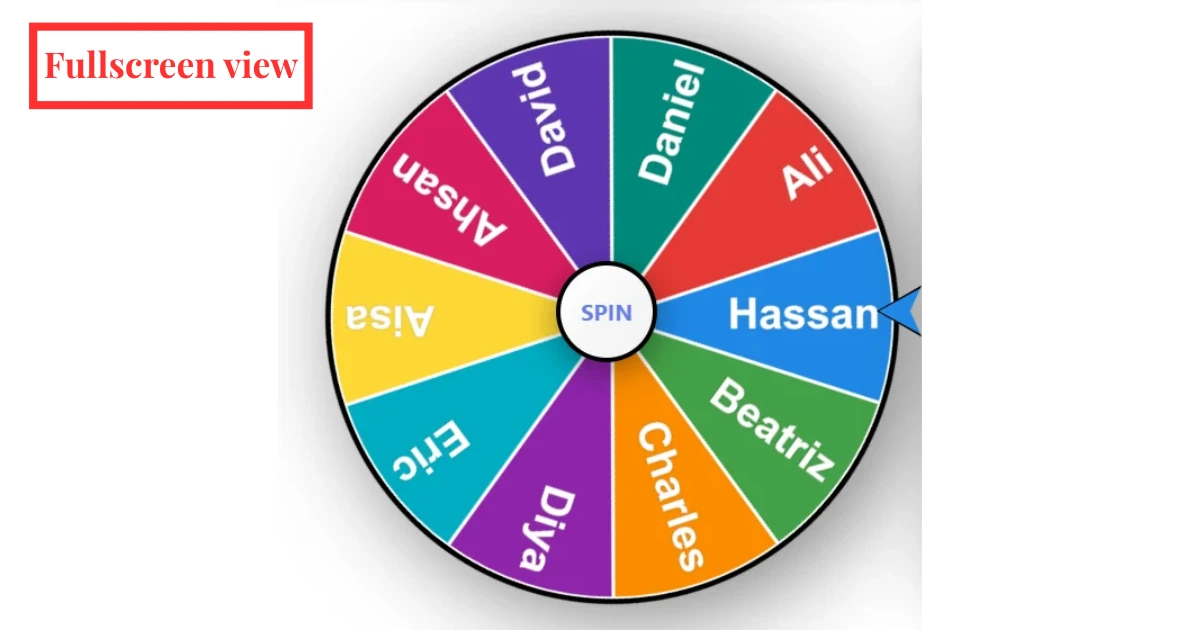
Click the fullscreen icon to expand the wheel. To return to the normal view, click the close (×) icon in the top-right corner or press Esc.
Before Fullscreen Mode
Fullscreen View
Step 02: Customize the Spin and Reveal Your Winner
Before you spin the wheel you can adjust the settings to control how the wheel behaves.
Adjust the Spin Settings
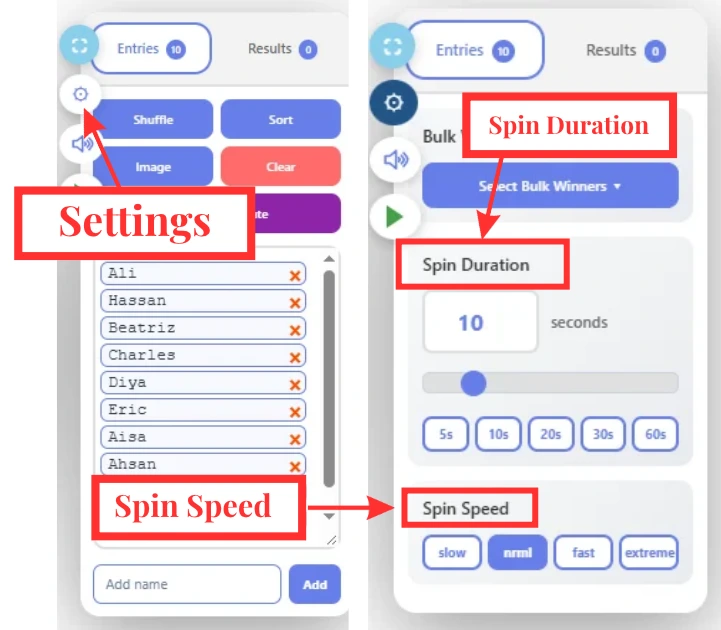
Click the Settings icon to open the spin controls.
You can change the following options:
Spin Speed: Choose Slow, Normal, Fast or Extreme depending on how fast you want the wheel to rotate. These settings give you more control over each wheel spin.
Spin Duration: Choose how long the wheel spins before stopping. Available preset times include 5, 10, 20, 30 and 60 seconds.
Pause and Resume the Wheel Spin
Need more control while the wheel is moving? The Pause and Resume feature lets you stop the wheel during an active spin and continue from the same position when you are ready. It can be useful when you want to build excitement before revealing the final result.
Wheel spinning
Pick Multiple Winners
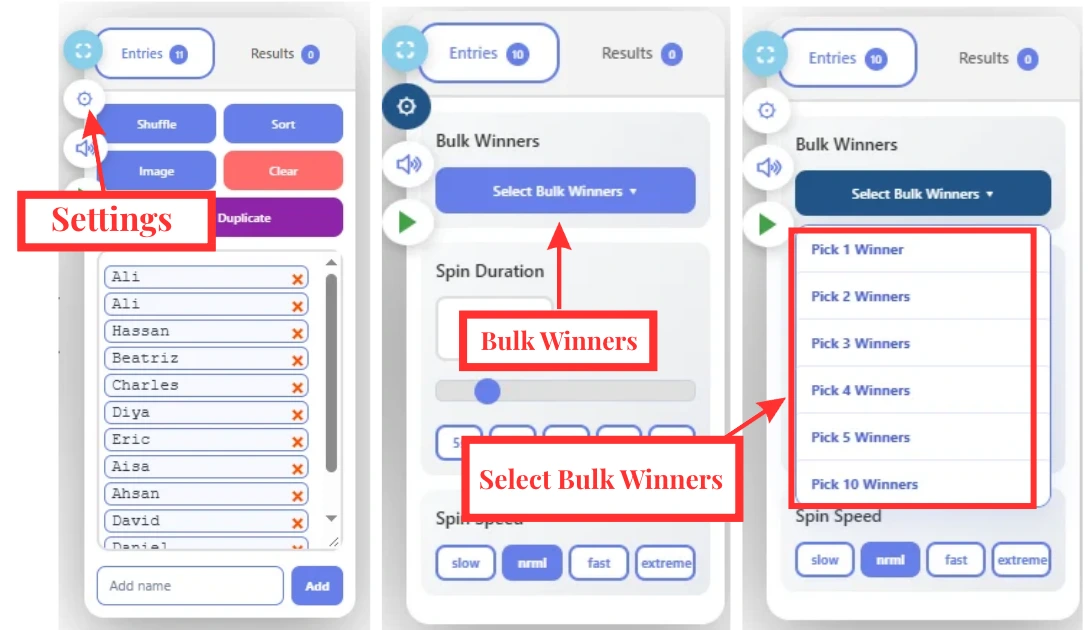
Need to select more than one name? Use the Bulk Winner feature. Open the settings panel, choose Bulk Winner and select how many winners you want to pick.
Available options include:
Pick 1 Winner, Pick 2 Winners, Pick 3 Winners, Pick 4 Winners, Pick 5 Winners, Pick 10 Winners.
After selecting the number of winners, click SPIN. The Wheel of Name will randomly choose the required number of winners without making you spin again and again. This feature is especially useful for giveaways, raffles, competitions, classrooms and team activities.
Spin the Wheel
After choosing your settings you can start the wheel in several easy ways. Click the SPIN button in the center, click directly anywhere on the wheel, press Space or use Ctrl + Enter on your keyboard. Once the wheel starts spinning, it will rotate and slowly stop on one random entry. You can use it to pick a name, item, task, prize or any other choice from your list.
Step 03: Manage the Winner After Each Spin
Once the Wheel of Names stops, the selected winner appears in a popup. You can manage the result directly from this window. You can close the popup, save the winner, take a screenshot, share the result or remove the winner before spinning again.
Close the Winner Popup
Click Close to exit the winner popup and return to the wheel. Closing the popup does not remove the selected winner from your entries, so you can continue using the wheel normally.
Save the Winner
Click Save to keep the selected winner in your results. This makes it easier to review previous winners later without needing to remember each result.
Take a Screenshot
Click Screenshot to capture the winner popup. You can save the image for your records or share the result with other people.
Share the Winner
Use the built-in sharing options to share the selected result with others. You can share your winner on: WhatsApp, Facebook, Instagram, YouTube, Pinterest.
Remove the Winner
Click Remove Winner to remove the selected name from the Wheel of Names. This is useful when selecting several winners because it helps prevent the same name from being selected again.

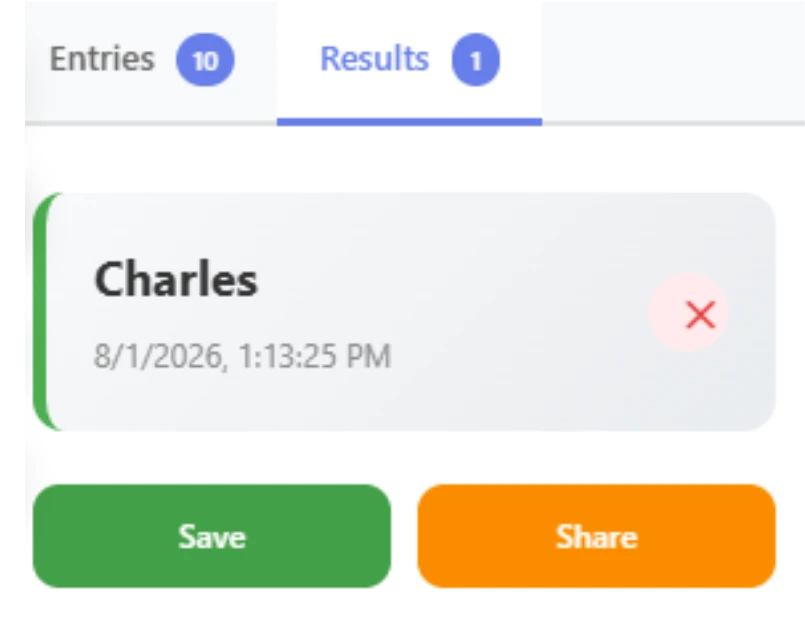
Step 04: View Your Spin Results
The Results tab keeps a history of the winners selected by the wheel. It also shows the date and time of each result making it easier to review your previous wheel spins.
YouTube Video Tutorial
Watch the video tutorial to see how to add names, adjust the settings, spin the wheel, select winners and use the main features of the Wheel of Names Spinner.
Popular Ways to Use the Wheel Spinner
Use the wheel for classroom activities, team tasks, games and giveaways. Here are a few examples.
Education and Classrooms
Teachers can use the Wheel of Names online to pick students, assign classroom tasks, create random groups, choose presentation order or select questions. The name picker can make classroom selections quicker and more engaging. It can also work as a random student selector when you want each student to have a fair chance.
Workplaces and Teams
Use the spinner during meetings and team activities. It can help you choose a presentation order, assign tasks, select discussion topics, create teams or pick a team-building challenge. A name wheel spinner is also useful when you want to choose one person from a group without deciding manually.
Games, Parties and Everyday Decisions
The picker wheel can make games and parties more fun. Use it to choose turns, pick dares, select prizes, choose activities, decide what to eat or make simple everyday decisions. When no one can decide, let the wheel decide for you.
Events and Giveaways
Use the Wheel of Names for raffles, contests, events and giveaways. Add the participant names, spin the wheel and let the free random picker select a winner in front of your audience. It is a simple way to make random selections during live events or online activities.